Pages

Saturday, December 8, 2012

Pinterest: For Your Interests

In case you haven't noticed (how could you not!?), Pinterest is the newest website taking over the Internet world. Just in case you don't know what it is, Pinterest is a website where you can post about your interests. Each post you make is called a 'pin'. You make 'boards', which are the categories that you post your pins in. For example, the boards that I tend to post in a lot are my Home Design, Teacher Tips, and Wedding boards. You follow other people who pin things that interest you, and their pins come up on your dashboard/home page. So if someone that I was following pinned a picture of a wedding dress I really liked, I would 'repin' it onto my Wedding board. It sounds a little confusing, but the more you use it, the more easy it is to navigate the site. If you haven't yet, I would recommend giving it a try! 

Image found here - this website has a Pinterest 101 tutorial, if you're curious!

I mentioned the fact that I have a board for Teacher Tips. I get a lot of really nice ideas when searching through the 'education' tag, and I post my findings on my Teacher Tips board. I think that Pinterest is a great resource for teachers. I've gotten ideas for lessons on Pinterest and put my own spin on them. One thing I'm unsure of is how fair use would play into this. It's hard to tell what the source for some of the images are, because so many people are reposting them. Sometimes, the poster isn't the owner of the content. So when I write a lesson and get my ideas from Pinterest, I'm unsure how to go about giving credit for those ideas. I'll have to look into that so I can be sure I'm not infringing upon fair use. 

How many of you use Pinterest? Leave your url and I'll check it out! Here's mine.

Saturday, December 1, 2012

Blogs - the forgotten topic

I realized that after blogging for an entire semester, I never covered how I feel about using blogs in the classroom! Let's change that now.

I think that blogs can be an incredibly useful tool for the classroom - and there are so many possibilities. Blogs could be used to have the class communicate - think about the shy kids you don't hear in class. Blogging could give those students an opportunity to share their opinions and get their voices heard. This class discussion online could also serve as a form of assessment - what did the students get out of your lesson? By reading their responses, you can tell who grasped what and who may need some more help. Blogs could also get the students interacting with each other. Class communication is so important, and blogs could certainly help facilitate that.

I wanted to see how real classes were using blogs, so I did some googling. Here are a few examples I really liked.

Ms. Cassidy's Classroom Blog - link below
Ms. Cassidy's Classroom Blog - This teacher shares what the class is up to - including guest speakers, projects, and more. This could be a great way to keep parents involved. Each student also has their own blog, which are listed on the side.

Youth Voices - link below
Youth Voices - This blog is a place for students and teachers to discuss topics across several categories via podcasts, videos, and blogs. It's a nice way for students and teachers to learn from each other.

There's obviously a lot more blogs out there to see and learn from! Here's where I got these from. Go out into the digital world and explore! You may be inspired by what you find. I feel that blogs are an amazing way to transform learning. There's so much you can do with them and they're extremely motivating for students. It gives them a real audience - they'll feel like real writers, knowing their writing will possibly be read by people all over the world. I will definitely be incorporating blogs into my classroom in the future.

Are there any educational blogs you love? Share them with me in the comments.

Friday, November 30, 2012

iMovie - A "reel" fun time

Happy Friday, fellow bloggers! With the semester coming to a close, I wanted to talk about a tool that I just started using this semester - iMovie. Up until now, I had absolutely no experience with iMovie. My first encounter with it was in EDR 321, a reading assessment course. A partner and I had to make a trailer dealing with reading/literacy. Check out the final result here!


iMovie in use - found here

It looks complex, but iMovie really isn't as difficult as it seems. The program has several templates available. All you have to do is plug in your own clips and add whatever effects you want. The trailers are shorter, but you can make longer movies if you choose. Also, if you're having trouble, Apple has support available. You can make your own videos that are very polished for whatever your desired purpose is - educational, family videos, etc. 

My desired purpose in the future would be classroom oriented. How cool would it be if your students could make videos like this? They would be so motivated and proud of their final projects. Students could make movies on book reports, science experiments, etc. I could send videos to parents to keep them involved. I could also use iMovie to make videos for the flipped classroom, which is a topic I discussed in a previous post. The possibilities are endless with iMovie.

I'm glad I got more hands-on experience with iMovie this semester, because I definitely want to use it in my future classroom. I'll be using it more in the coming weeks as my group and I make our PSA for this class. What is your group doing for the PSA project? Feel free to comment and share your ideas. 

Friday, November 16, 2012

Be smart about Smart Boards!

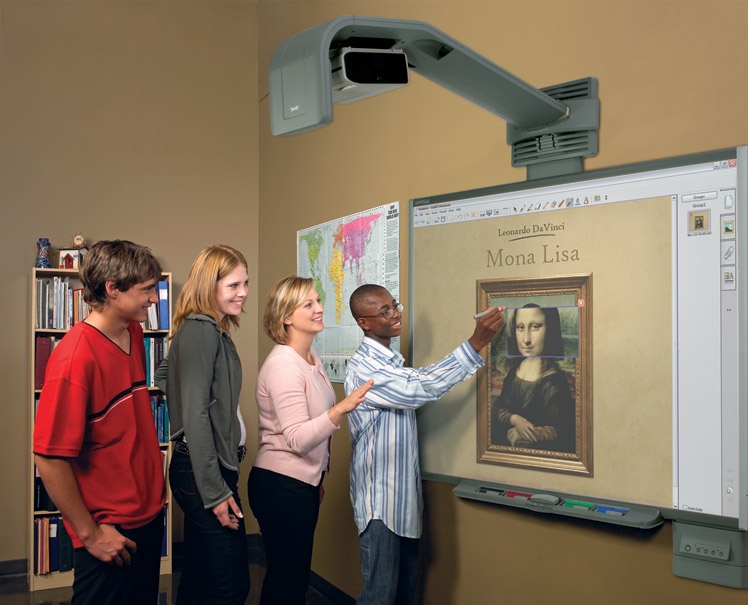
Happy Friday, fellow bloggers! I wanted to make a post about a topic that was discussed pretty early on in my technology course - interactive whiteboards. There are different kinds, but Smart Boards are probably the most popular/common. If you're unfamiliar with this topic, let me share what interactive whiteboards are.


Here is an image of a Smart Board in use - found here

This is what an interactive whiteboard looks like. It looks like an LCD projector, but you can write on the board with the pens (seen at the bottom of the board in the picture), touch the board, and do many other things on it. That's where the 'interactive' part of 'interactive whiteboard' comes from. Here's an example of a Kindergarten teacher using her Smart Board for morning meeting, to give you an example. There are several Smart Board tutorials online, if you're interested. 

What I want to talk about is some ways I might use an interactive whiteboard in my classroom, as well as what I like and dislike about them. I really like the idea of using it for morning meeting, like the video I linked you to above. I've also seen interactive whiteboards used to display books/ebooks. The Smart Board software has several interactive games across the content areas. Interactive whiteboards can be an extremely helpful tool in the classroom. There's increased motivation - students want to have the chance to come up and use the board. Also, when used correctly, lessons can be enriched through this tool. This is where I think the interactive whiteboard runs into some problems. Some teachers use them just because they're available, and the students aren't getting anything meaningful out of it. It's important to think carefully about having a real purpose for the interactive whiteboard. Another downfall is that only one person at a time can use the whiteboard. Other students may not pay attention if they're not the ones using the whiteboard. If you're going to use an interactive whiteboard, have something that the other students can do at their desk while someone is doing it on the whiteboard. For example, if someone is practicing writing a word on the board, have the rest of the class doing the same thing at their desk on paper. It's important to keep all students engaged - the interactive whiteboard alone may not be enough.

Overall, I really do like interactive whiteboards. I think that they're a nice tool to enrich content. My suggestion is the same as any other technology tool - use carefully! Don't just use it because you can. What are your thoughts on interactive whiteboards? How have you used them in your field placements/classrooms? Leave a comment and share your experiences with me.

Monday, November 5, 2012

Nook? Book? Let's take a look!

My last post talked a lot about the features of eBooks and eReaders. This week, I want to dive into the real meat - what's better, books or Nooks? When I say 'better', I mean in terms of education. What will allow students to comprehend the text better? Which will motivate them more? The questions go on and on. So - what's better?

A Nook or a book? (source)

Well, in reality, there isn't a ton of research about this topic (boy, that was anti-climactic). The eReaders and such are still fairly new technology. As Dr. Schugar told my class today, the study he did with his wife and colleague found that for college students, there was not much difference between students that read on eReaders and those that read traditional text. Definitely check out the article here. Here is an excerpt from that article, discussing the results of their study:

"Overall, whether reading from a text or an eReader, students recalled the same number of idea units from the text, regardless of what mode of reading they used. Likewise, on all but the first Quick Write, there were no discernable differences in the complexity of student responses. On the whole, students’ responses were fairly low-leveled, and few students were able to provide responses that looked at the material beyond what was explicitly and implicitly stated in the text" (Schugar, J. T., Schugar, H., & Penny, C., 2011, P 183).

So, the idea here is that it's really not much different whether you're reading on an eReader or in an actual book. I would say that what makes a difference isn't the device you're reading on - it's whether you're reading for meaning or not. I feel that personally, as long as I'm reading with a focus, I don't get less out of an eBook than I do out of print. As long as the students are reading meaningful, quality texts and comprehending them, I think either works. There are pros and cons to each, of course.

One thing we talked about in class today is that while eReaders are highly motivating - they can also be very distracting. On an iPad, for example, one might get sidetracked by playing around with the many features instead of reading. Also, it's more common for people to be executing during-reading strategies - such as highlighting and note-taking - with traditional texts. Personally, I have a Kindle, and I highlight from time to time. However, I mostly read for leisure on my Kindle. I read texts for academic purposes with traditional text, and I highlight and write notes often. Perhaps if I read more informational texts on my Kindle, I would take notes and highlight more. I'd be interested to try it and see if if makes a difference in my own life.

So, will I use eReaders in my class? Definitely. Will I use them all the time? No. As I touched on in my last post, I want to use those devices where it's appropriate. I want to use them to supplement learning, not as a big flashy show - ooh look at me, I have an iPad! Those devices are great and all, but they should be used in a meaningful way, not just because they're available. As we discussed in class today, I want to use technology to transform my learning, not just because I can.

What are your thoughts on the Nook vs. Book debate? Have any articles you'd recommend? Feel free to comment!